

Portable Mini Projector: A Practical Guide to Choosing and Using One
A portable mini projector can make movie night more flexible, but picture size, room brightness, power, and connections all shape the experience. A compact design is handy, but it doesn’t guarantee a bright image or a setup that suits every room. Before choosing one, think about where you’ll watch and what you’ll connect.
Projector listings can be hard to compare when their numbers and labels don’t explain how a device will perform in your space. This guide breaks down the basics and shows how to plan for casual home viewing or an outdoor session. You’ll learn what to consider about brightness, resolution, placement, and connections, plus how to prepare a simple setup.
Everyday Gadgetz sells an LCD projector listed with built-in speakers, HDMI compatibility, 600 lumens, and “320P” in its product name. Those details are useful starting points, but they don’t describe every aspect of performance. Here’s how to interpret them and decide whether the projector fits your viewing plans.
Key Takeaways
- Match a portable mini projector to where and when you plan to watch. Surrounding light affects how clearly the image appears.
- Compare specifications carefully. Lumen figures and resolution terms need context to be useful.
- Plan your setup around a stable surface, a suitable power source, and compatible connections.
- The Everyday Gadgetz projector is listed with LCD, HDMI compatibility, built-in speakers, 600 lumens, and “320P.” These details alone don’t guarantee a particular viewing experience.
- Decide whether its compact format suits casual viewing by considering your room, outdoor conditions, and expectations for the picture.
What Is a Portable Mini Projector and Its Purpose?
A portable mini projector gives you a way to show video or photos on a larger surface without keeping a television in one place. It receives video from a source and projects an enlarged image onto a wall or screen. The projector creates the image; the viewing surface displays it.
A portable mini projector is a compact device that projects video or images onto a separate viewing surface. “Portable” describes its practical size and potential to move between settings. It doesn’t promise a particular brightness, image quality, battery life, or effortless setup. Those depend on the projector’s features and the conditions where you use it.
How a compact projector turns video into a visible image
A playback source sends video to the projector through a supported connection. The projector processes that signal and directs light to form an image on a wall or screen. LCD is one display technology. It uses liquid crystal elements to help create the picture. Other projection technologies exist too; Video projector offers a broader overview. The viewing surface, projector placement, and surrounding light all affect what you see.
Where a portable mini projector can fit into everyday life
At home, a portable mini projector can suit a casual movie night, shared family viewing, or a presentation when a larger display is useful. You can move it between rooms when your setup changes. Think of it as a flexible viewing option, not a screen that works equally well in every space.
Outdoor viewing takes planning. Darkness or low ambient light helps the image remain visible, while a stable surface keeps the picture steady. You’ll also need to plan for power and the connection to your video source. A compact size can make carrying easier, but it doesn’t automatically make a projector suitable for every trip. Consider the available space, setup, and what you’ll need to bring.
Which Portable Mini Projector Specifications Matter Most?
A listing is easier to compare when you connect each specification to your viewing plans. Before you choose, focus on the details that affect everyday use:
- Brightness: Look for the lumen figure and its measurement type. Don’t assume figures using different standards are directly comparable.
- Resolution: Find the image detail the projector can display, not just the video formats it can accept.
- Inputs: Match the listed connections to your intended video source and the cables you have.
- Audio: Check whether the projector has built-in speakers and whether they suit your listening needs.
- Placement: Consider where the projector can sit and how much space you have for the image size you want.
Brightness and resolution: what listing terms can tell you
Lumens describe brightness, but the number needs a measurement type to be useful for comparison. The Everyday Gadgetz listing gives 600 lumens. Since the figure isn’t labelled as ANSI lumens or another measurement, treat it as a product detail rather than a direct comparison with figures measured differently.
Resolution describes how much detail an image can display. The product name includes “320P,” but that label alone doesn’t identify the projector’s native resolution. Also distinguish input support from display resolution: a projector may accept a video signal in a particular format without displaying the image at that same resolution. For more examples of how portable models are assessed, see PCMag’s guide to best portable projectors.
Connections and sound: planning for the source device
HDMI is a common way to connect a compatible source, but the source, cable, and projector must work together. The Everyday Gadgetz projector is listed as HDMI-compatible. That doesn’t mean every phone, computer, or video format will connect directly. Compare the connection options with the ports on the device you plan to use.
The projector also has built-in speakers, which can keep a casual setup simple. The presence of speakers doesn’t tell you how loud or full the sound will feel in your room. Think about your audience and surroundings, then decide whether built-in audio suits the session. To explore the projector, visit the portable mini projector.
Will a Portable Mini Projector Work in Your Room or Outdoors?
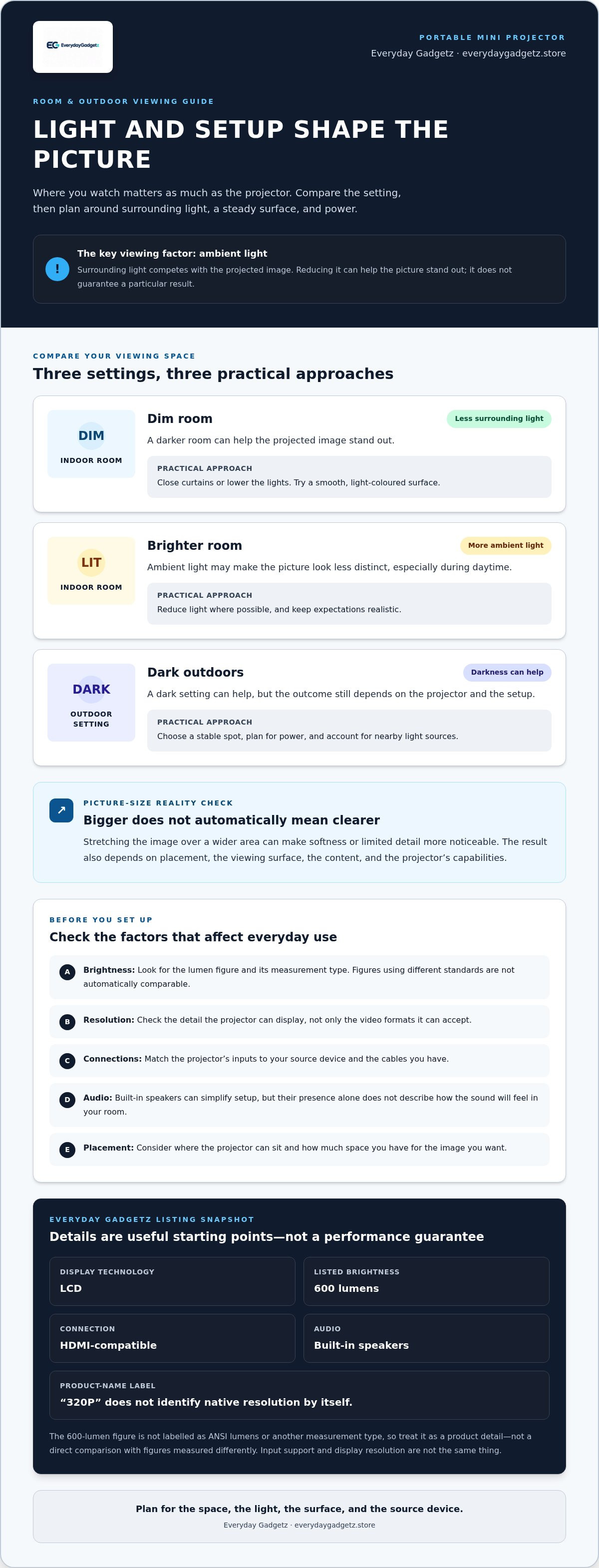
A portable mini projector can suit different spaces, but the setting matters as much as the device. Ambient light competes with the projected image, so reducing room light can make the picture easier to see. A larger image isn’t automatically clearer. Stretching the image over a wider area can make softness or limited detail more noticeable. Results also depend on placement, the surface, the content, and the projector’s capabilities.
| Setting | What to expect | Practical approach |
|---|---|---|
| Dim indoor room | Less surrounding light can help the image stand out. | Close curtains or lower lights, and try a smooth, light-coloured surface. |
| Brighter room | Ambient light may make the picture look less distinct. | Reduce light where possible and keep expectations realistic, especially during daytime. |
| Dark outdoor setting | Darkness can help, but the result still depends on the projector and setup. | Choose a stable spot, plan for power, and account for nearby light sources. |
How room light and viewing distance change the picture
Try the space before settling on a setup. Throw distance is the space between the projector and the surface receiving the image. Moving a projector can change the image size, but the usable distance and picture depend on its design. Start with a stable position and adjust while viewing your content. A plain, even surface can help avoid distractions from texture or unevenness.
Portable projector versus a television for casual viewing
A projector offers a flexible image size and can move between suitable spaces. A television provides a fixed display that’s ready to use in one place. TVs may be a better fit for bright rooms, while a projector can suit dimmer viewing or occasions when a larger image is useful. Consider your room, viewing habits, and how often you’ll move the display. CNET’s guide to a portable projector for movies and gaming can help frame choices around intended use.
How Do You Plan a Simple Portable Projector Setup?
A little preparation makes a viewing session easier. Choose a dim location, position the projector and viewing surface, connect a video source, then test the image before everyone settles in. With a portable mini projector, these basic checks can prevent last-minute cable or placement changes.
Prepare the room, surface, and power
Pick a stable spot with a clear path from the projector to the wall or screen. Keep it away from edges where it could be knocked, and reduce stray light if you can. A plain, even surface is a practical starting point. Walls and screens can show images differently, so don’t expect identical results on every surface.
Before switching on, check how the projector receives power and where its power source will sit. Make sure the cable can reach without crossing a walkway or pulling on the device. For an outdoor setup, plan for both a steady surface and suitable power access. Mini Projector Setup Tips for a Simple Start offers more guidance for getting a viewing area ready.
Connect a source and test the image
Use HDMI if both the projector and your video source support it. Check the source’s output options and the cable connection, then select the right input on the projector if required. HDMI compatibility doesn’t mean every device connects in the same way, so plan around the actual ports and instructions for your equipment. For more connection basics, see Portable Projector with HDMI: How It Connects.
Test with the content you plan to watch. Confirm that the image appears, adjust the projector’s position if needed, and check that the picture fits the surface. If the device has focus or image-alignment controls, use them according to its instructions rather than assuming every projector works the same way. Check the sound too, especially if you’ll be watching with a group.
- Location: Dim, stable, and clear of foot traffic.
- Surface: Plain and suitable for the planned image.
- Connections: Source, input, and cable ready to use.
- Final check: Image, focus, alignment, and sound tested before viewing.
Ready to plan a compact viewing setup? Explore the Everyday Gadgetz projector and see how its listed HDMI compatibility and built-in speakers fit your setup.
Is the Everyday Gadgetz Portable Mini Projector a Practical Fit?
The Everyday Gadgetz portable mini projector offers a compact way to share video at home or in a suitable outdoor setting. Its listing describes an LCD projector with HDMI compatibility and built-in speakers, alongside the terms “600 lumens” and “320P.” These details are useful to consider, but they don’t describe exactly how the picture or sound will feel in your space.
What the listed features may mean for everyday use
A compact format can make it easier to move a projector between suitable viewing spots, though it doesn’t tell you its exact weight, power setup, or what you’ll need to carry. HDMI compatibility can be useful when your source device supports a matching connection. It doesn’t mean every phone, computer, or other device will connect directly. The built-in speakers provide an audio option, but the listing doesn’t indicate how loud or full they’ll sound in a particular room.
Read the brightness and image labels carefully. “600 lumens” is the listed brightness figure, but it isn’t labelled with a measurement type, so don’t compare it directly with figures using a different standard. The product name includes “320P,” but that label alone doesn’t identify the projector’s native display resolution. Picture clarity also depends on projected image size, content, surface, and surrounding light.
Who may find this projector useful
It may suit casual movie nights, family viewing, or a shared-screen moment where a compact projector fits your routine. A dim room or dark outdoor setting can make projected images easier to see, while nearby light may reduce visibility. Plan for a stable position, suitable power access, and an image size that suits the room. If sound needs to carry across a larger space, consider whether built-in audio will be enough for your audience.
This projector is a practical fit if portability and a simple shared viewing setup matter more than assuming a particular level of brightness, detail, or sound. If you need a consistently clear picture in a bright room or have specific connection requirements, compare the listed features with those needs rather than relying on the product name alone.
Explore the portable mini projector listing and weigh its stated features against your room, source device, and viewing plans.
Choose a Setup That Fits Your Plans
A portable mini projector is most useful when its features and your viewing space work together. A dimmer room, stable placement, and a compatible video source can make setup more straightforward. Bright surroundings, surface choice, and image size affect what you see. Check what specification labels mean instead of judging a projector by numbers alone.
The Everyday Gadgetz listing gives you concrete details to weigh: LCD, HDMI compatibility, built-in speakers, 600 lumens, and “320P.” The lumen figure isn’t labelled with a measurement type, and “320P” doesn’t identify the display resolution. Treat both as product details rather than a complete picture of performance. Consider your audio needs, power access, and intended source device as well.
If those features line up with your casual home or outdoor viewing plans, take a closer look at the product: Explore the portable mini projector. Choose a suitable space, plan your connections, and set realistic expectations for the viewing setup.
Frequently Asked Questions
What is a portable mini projector used for?
A portable mini projector displays video or images on a wall or screen, making it useful for casual movie nights, presentations, or shared family viewing. Unlike a television, it can move to different suitable spaces, but it needs a separate viewing surface. You’ll also need a compatible video source and suitable power. The room, placement, and surrounding light all affect the viewing experience.
Can you use a mini projector outdoors?
Yes, a mini projector can be used outdoors if you have a dark or suitably dim setting, a stable place for the device, and access to the power it requires. Nearby lights and dusk can make the projected image harder to see, so don’t assume it will work well in daylight. Plan where viewers will sit and how you’ll connect the video source before setting up.
How many lumens should a portable mini projector have?
There isn’t one lumen figure that guarantees a good picture in every setting. Room light, projected image size, and projector capabilities all matter. Check whether a listing identifies its brightness measurement type, since lumen figures measured in different ways shouldn’t automatically be compared. The Everyday Gadgetz listing says “600 lumens,” but that label doesn’t specify the measurement type or predict how bright the image will look in your room.
Is a portable mini projector good for everyday home use?
A portable mini projector can suit everyday home use if you want a flexible option for films, family viewing, or sharing images. It works best when you can choose a suitable surface, reduce ambient light, and arrange power and connections. For frequent viewing in a bright room, a fixed television may be more convenient. Consider how often you’ll set it up and what picture and sound you expect.
Can I connect a phone or laptop to a portable mini projector?
You can connect a phone or laptop if the projector and device support a compatible connection. HDMI is a common wired option, but a device may need an adapter, and compatibility can vary by source and projector. The Everyday Gadgetz product listing describes HDMI compatibility. Match the ports and connection instructions to the devices you plan to use.
Does a mini projector have good picture quality?
Picture quality varies by projector and viewing conditions. Resolution affects image detail, while brightness, projected size, placement, surface, and ambient light also shape what you see. A larger projected image isn’t automatically clearer. Look for the displayed resolution rather than assuming a video input label means the image is displayed at that resolution. The “320P” label in the Everyday Gadgetz listing doesn’t identify the projector’s native display resolution.
Do portable mini projectors have built-in speakers?
Some portable mini projectors have built-in speakers, while others may require a separate audio setup. Check the individual product listing and think about the room and audience, since the presence of speakers alone doesn’t tell you how loud or full they’ll sound. The Everyday Gadgetz projector includes built-in speakers for casual viewing, but your audio needs and surroundings will affect whether they’re enough.